Keywords: solo entrepreneurship, digital infrastructure, workstation setup, financial management tools, private cloud deployment, remote work, secure USB sticks, mobile Linux phones, open-source software, virtualization.
1 An Unexpected Beginning: From Laptop Mishap to Linux Liberation
I was skateboarding at the railway station with my Lenovo T410 on my back when suddenly, I slipped and fell, landing squarely on my laptop. The impact left the LCD screen leaking and the fans bent. It was a devastating blow, especially considering I had intended to use this computer for my studies.
But sometimes, adversity leads to unexpected opportunities.

That day marked the beginning of my transformation from a serious musician to the dedicated Linux user I am today. With my Lenovo out of commission, I turned to my father’s old Dell Latitude for solace. Fortunately, a friend recommended giving Linux Mint a try, a decision that would change the course of my digital life.
You see, the Dell Latitude was a relic of a bygone era, struggling to run even the most basic tasks on Windows XP. But with Linux Mint, a free and open-source operating system, it breathed new life into the aging hardware. It was a revelation—a testament to the power of community-driven software.
Since that pivotal moment, I’ve come to view free software not just as a practical solution but as an ethical imperative for modern societies. It embodies the values of transparency, collaboration, and accessibility that are essential for fostering innovation and empowerment in the digital age.
As I embarked on my entrepreneurial journey with my one-man business, I carried this ethos with me. I made a conscious decision to build my venture without relying on proprietary software, embracing open-source alternatives wherever possible. It wasn’t always easy, but it was a choice rooted in principles that resonate deeply with me.
In the pages that follow, I’ll share the lessons I’ve learned, the challenges I’ve faced, and the triumphs I’ve celebrated on this path to liberation from proprietary software. Join me as I recount my experiences and offer insights into how embracing open-source technology has empowered my one-man business to thrive in a world dominated by closed systems.
2 Creating a Secure Workstation
In today’s digital landscape, establishing a secure workstation environment is crucial for individuals and organizations alike. From selecting a Linux distribution to choosing a display manager, each decision plays a vital role in ensuring a robust setup. Let’s explore key considerations for building a secure workstation tailored to your needs and preferences.
2.1 Choosing the Right Linux Distribution
Selecting the ideal Linux distribution was a challenging task. Arch Linux appealed to me with its minimalism and customizability, but its steep learning curve posed difficulties, especially a decade ago. Debian’s commitment to free software and community-driven development resonated with me, but I faced challenges with graphic card compatibility, particularly with NVIDIA’s proprietary drivers. Ultimately, Ubuntu 22.04 emerged as a balanced choice, offering the benefits of Debian’s philosophy while providing better compatibility, especially for NVIDIA graphics cards.
2.2 X11 vs. Wayland: Display Manager Selection
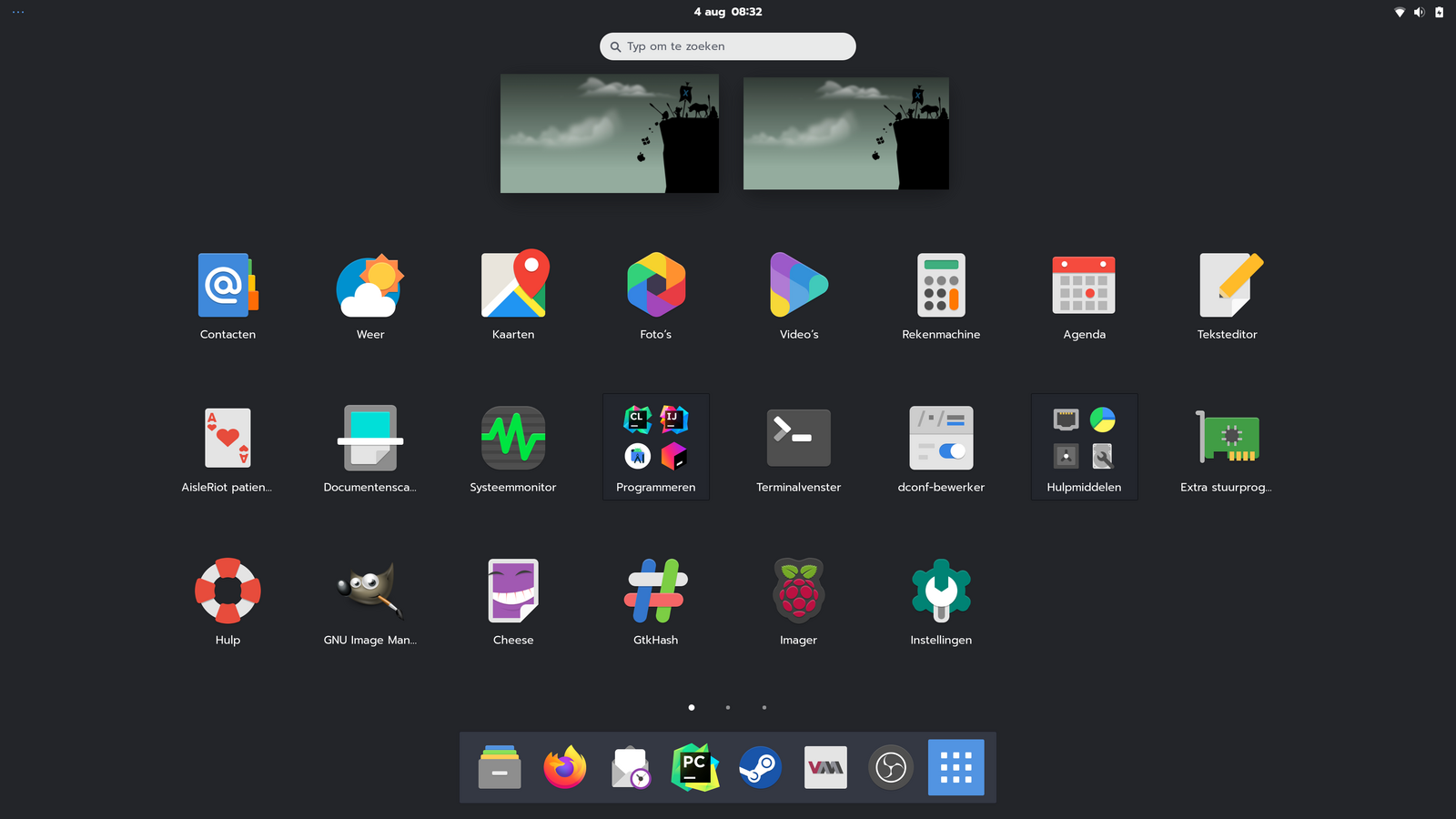
The choice between X11 and Wayland for display management depends on specific requirements and preferences. X11 remains relevant, particularly for gaming and screen recording, due to its compatibility and mature ecosystem. However, Wayland offers advantages in security, performance, and simplicity. It excels in delivering a modern and streamlined desktop experience, particularly on high-resolution displays. The decision between X11 and Wayland hinges on factors such as compatibility with legacy software and the desire for a polished user interface.
In conclusion, establishing a secure workstation involves making informed choices about Linux distributions and display managers. By considering factors such as compatibility, performance, and user experience, you can create a workstation environment that enhances productivity and security.
3 Financial Administration on Linux

Starting my own company highlighted the need for efficient financial tools. As someone valuing privacy and data control, I sought offline solutions compatible with Linux.

Ease of importing CSV files from my bank was crucial. GNUCash proved ideal, with smart transaction type recognition and optimized classifications, streamlining my accounting.
GNUCash, an open-source accounting application, impressed with its Linux compatibility and local data storage, ensuring full control over financial records. Integration with my Private Cloud added security and convenience.
While GNUCash handled bookkeeping adeptly, its invoice generation capabilities fell short. To bridge this gap, I turned to LaTeX, renowned for precise document creation.

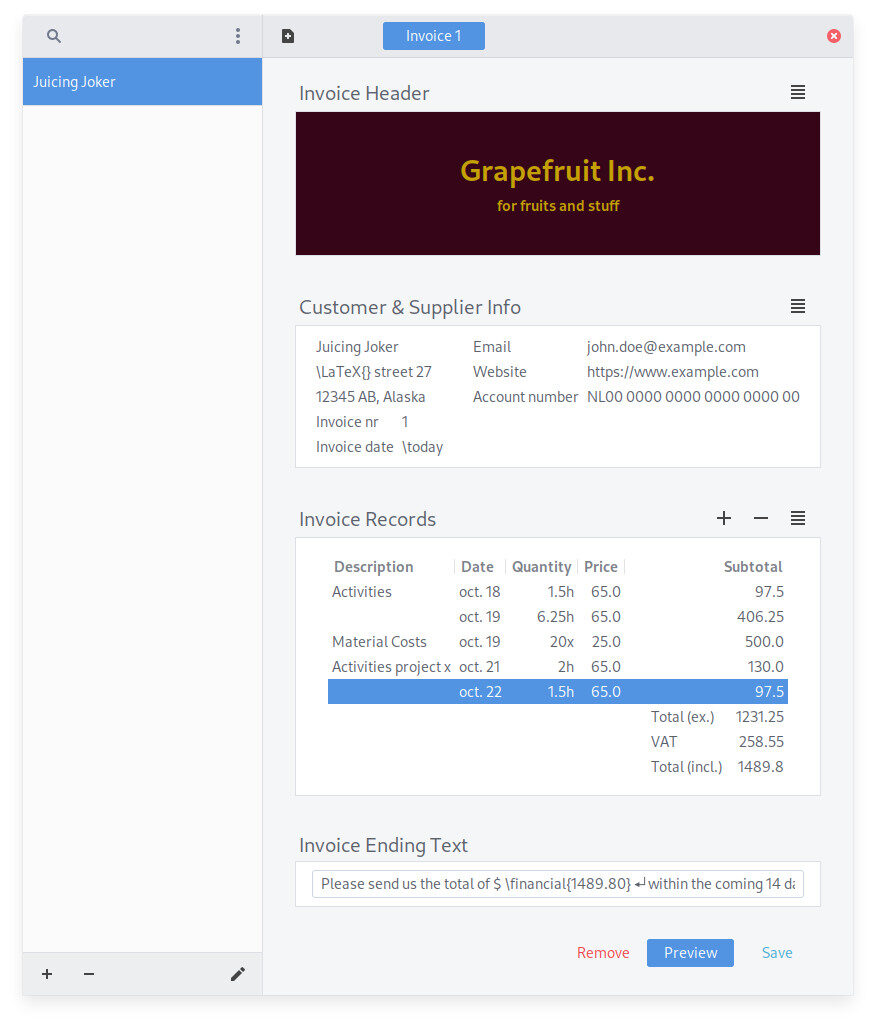
Combining GNUCash’s functionality with LaTeX’s formatting, I developed GinVoice, a tailored invoice generation app. Leveraging Python GTK development, I ensured an intuitive user interface.
Integration with an existing LaTeX invoice template seamlessly streamlined the process, resulting in a versatile solution meeting all invoicing needs while preserving privacy and control.
In conclusion, GNUCash and GinVoice form an efficient financial toolkit for my Linux-based business, empowering effective finance management while upholding principles of privacy and control.
4 Building and Deploying a Private Cloud
In my pursuit of greater control over my digital infrastructure, I set out to construct and implement a private cloud solution. This endeavor unfolded in several stages, each contributing to the realization of a robust and flexible cloud environment tailored to my specific requirements.
4.1 Embracing Autonomy Over Hosted Solutions
The decision to opt for a private cloud stemmed from a desire for autonomy and flexibility, seeking to overcome the limitations and recurring costs associated with hosted services. By embracing a private cloud model, I aimed to gain full control over my infrastructure while mitigating dependencies on external providers.
4.2 Leveraging Virtualization Technology
Central to the development of my private cloud was the utilization of virtualization technology, particularly Kernel-based Virtual Machine (KVM). This technology allowed for the efficient allocation and management of resources, enabling the deployment of multiple virtual servers within a single physical machine. By leveraging KVM, I optimized resource utilization and gained the flexibility to scale server solutions according to evolving business needs.
4.3 Overcoming Connectivity Challenges with DNS Servers
Ensuring seamless connectivity across different network environments posed a significant challenge in the development of my private cloud. To address this challenge, I implemented a robust DNS infrastructure consisting of two DNS servers. This setup enabled robust network resolution and facilitated smooth communication between internal and external services, regardless of network configurations or transitions.
4.4 Ensuring Privacy and Security with OpenVPN
Privacy and security were paramount considerations in the design of my private cloud solution, particularly concerning remote access and communication. To safeguard data integrity and confidentiality, I integrated OpenVPN into the cloud infrastructure. OpenVPN provided secure tunneling for remote connections, encrypting data and protecting it from interception or monitoring on public networks, thereby ensuring privacy and security in remote access scenarios.
4.5 Streamlining Collaboration with Git Shell Server
Efficient collaboration and version control are indispensable components of modern business workflows, particularly in software development. To streamline collaboration processes within my private cloud environment, I established a Git Shell server. This centralized repository facilitated code collaboration and version management, providing a platform for developers to collaborate seamlessly and efficiently.
4.6 Facilitating Communication with Mattermost
Effective communication is essential for productive collaboration, especially in distributed teams. To enhance communication within my private cloud environment, I integrated Mattermost, a versatile messaging platform tailored for technical teams. Mattermost offered features such as real-time messaging and code markup, enhancing collaboration and productivity across projects within the cloud infrastructure.
4.7 Orchestrating Service Distribution with HAProxy
Efficient service distribution and load balancing are critical for optimizing performance and availability within a cloud environment. To achieve this, I leveraged HAProxy, a powerful load balancer and proxy server. HAProxy enabled effective distribution of services across the cloud infrastructure, optimizing availability and scalability while conserving resources and ensuring optimal performance.
4.8 Securing Business-Critical Applications with Private GitLab Runners
Securing business-critical applications within the private cloud environment was of utmost importance to safeguard data and ensure reliability. To mitigate risks associated with shared infrastructure, I deployed private GitLab runners. These dedicated resources facilitated the building and deployment of applications within a secure and isolated environment, enhancing security and reliability for mission-critical workflows.
4.9 Safeguarding Data with Robust Backup Solutions
Data integrity and resilience are paramount in any cloud environment. To ensure robust backup and disaster recovery capabilities, I implemented comprehensive backup solutions utilizing tools like Déjà Dup. These solutions facilitated regular backups of critical data, ensuring data integrity and enabling seamless recovery in the event of data loss or system failures.
4.10 Enhancing Accessibility with Email Server and APT Mirror
Accessibility and responsiveness are key considerations for effective cloud infrastructure. To enhance accessibility within my private cloud environment, I deployed an email server for streamlined communication and an APT mirror to cache Ubuntu packages locally. These enhancements improved efficiency and responsiveness, ensuring smooth operation and timely software updates within the cloud infrastructure.
4.11 Supporting Web Services with Apache2
Web services play a crucial role in modern business operations, requiring a reliable platform for hosting web content. To support web services within my private cloud environment, I deployed Apache2, a versatile web server capable of hosting various web applications and services. Apache2 provided a robust and scalable platform for hosting web content, accommodating diverse requirements and usage scenarios within the cloud infrastructure.
5 Enhancing Remote Work Practices with Custom Linux USB Stick
During my time at a large company, I encountered remote working practices, but found existing solutions lacking in security and efficiency. This inspired me to develop my own custom Linux USB remote working stick, focusing on security and productivity.
5.1 Addressing Security Concerns
The motivation behind creating the custom Linux USB stick was to address security concerns associated with remote work. While the organization provided USB sticks with pre-configured Windows environments, I found them inadequate for maintaining confidentiality and protecting sensitive data.
To enhance security, I developed a custom ISO file based on Ubuntu 22.04, a secure Linux distribution. The partitions on the USB stick were encrypted to safeguard data in case of loss or theft. Additionally, I incorporated persistent storage, allowing users to securely save files and settings across sessions.
5.2 Integration with VPN Service
A critical security measure implemented in the custom USB stick was integration with a VPN (Virtual Private Network) service. This ensured that all network traffic originating from the stick would be routed through the VPN tunnel, encrypting data and protecting it from interception on public networks.
By enforcing all network traffic through the VPN, I mitigated the risk of data breaches and unauthorized access, particularly in public Wi-Fi networks. This level of protection was essential for maintaining confidentiality and compliance with privacy regulations.
5.3 Optimizing Productivity and Application Access
The custom Linux USB stick was designed to optimize productivity for remote workers. Unlike Windows-based sticks provided by the organization, my solution offered the flexibility to run a wide range of applications, including software like PyCharm.
The stick leveraged the host device’s hardware capabilities, allowing users to access resources efficiently, even when working remotely. This ensured seamless task performance without experiencing compatibility issues.
The development of the custom Linux USB remote working stick represented a significant step towards enhancing remote work practices, focusing on security and productivity. By prioritizing security measures such as encryption and VPN integration, and optimizing application access and performance, I aimed to provide a reliable solution for remote workers navigating the transition to remote work environments.
6 Exploring Mobile Phones with Linux: The Promise and Challenges
In 2019, I purchased a Librem 5 Linux phone from Purism, investing in the future of mobile technology. The Librem 5 boasted security features such as kill switches for the microphone, camera, Wi-Fi, Bluetooth, and mobile network, providing users with control over their privacy. Additionally, it promised support for encrypted phone calls, although in practice, this feature was limited due to the lack of support from most Dutch telecom providers, with only a few exceptions like Voys.
However, while the Librem 5 represented progress in mobile privacy and security, its adoption faced challenges. One major hurdle was the compatibility of mobile applications. Many popular apps, particularly mobile authenticator apps, were only available for iOS or Android, leaving Librem 5 users with limited options for essential functionalities.
Furthermore, governmental institutions and services in the Netherlands were slow to embrace the Librem 5 and other Linux-based mobile platforms. Critical services such as the Berichtenbox (Dutch government messaging system) and CoronaMelder (COVID-19 contact tracing app) were exclusively available on Apple and Google platforms, excluding users of alternative mobile operating systems.
Despite its promising features, the journey with the Librem 5 was not without challenges. One significant drawback was the extensive wait time for delivery, with many customers, including myself, waiting for over two years to receive their devices. This delay hindered widespread adoption and tested the patience of eager supporters.
In conclusion, while the Librem 5 and other Linux-based mobile phones offer compelling features and advancements in privacy and security, they still face barriers to widespread adoption. Compatibility issues with essential applications and slow adoption by governmental and institutional services underscore the challenges ahead. Nevertheless, ongoing development and innovation in the field hold promise for the future of mobile privacy and security.
7 Conclusion
In my journey to establish a one-man business and cultivate a secure digital infrastructure, I’ve encountered numerous challenges and opportunities for growth. From selecting the right Linux distribution to deploying a private cloud, each step has been crucial in shaping my venture’s success.
By embracing open-source technologies and leveraging Linux, I’ve created a workstation environment aligned with my principles of privacy and data control. After careful evaluation, I settled on Ubuntu 22.04 as my workstation OS, striking a balance between philosophical ideals and practicality.
Furthermore, my commitment to self-reliance led me to explore alternative solutions for financial administration and server deployment. With GNUCash and GinVoice, I’ve streamlined financial management tasks while maintaining data control. Building and deploying my private cloud infrastructure has provided flexibility and scalability tailored to my business needs.
However, challenges persist, particularly in mobile technology. Despite investing in a Librem 5 Linux phone, compatibility and market adoption remain limited. Crucial mobile applications often remain exclusive to mainstream platforms, hindering alternative mobile operating systems’ traction. The lengthy wait to receive the Librem 5 underscores the challenges of pioneering technology adoption.
As I reflect on this journey, I acknowledge the ongoing pursuit of independence in technology. Continuous learning, experimentation, and adaptation are essential. With a secure workstation, efficient financial tools, and a versatile private cloud, I’m equipped to tackle challenges and seize opportunities on the path to success.
8 Discussion
In this article, we’ve explored various aspects of establishing a one-man business and building a secure digital infrastructure. Let’s delve deeper into some key discussion points:
8.1 Embracing Open-Source Software
Open-source software offers advantages for small businesses, including cost savings, flexibility, and enhanced security. How has your experience been with integrating open-source solutions into your business operations?
8.2 Privacy vs. Convenience
Balancing the convenience of cloud-based services with concerns about data privacy and control is crucial. What strategies do you employ to ensure data security while leveraging cloud technologies for your business?
8.3 Securing Workstation Environments
Creating a secure workstation environment is essential for protecting sensitive business data. What security measures have you implemented in your workstation setup, and what challenges have you encountered?
8.4 Financial Management Tools
Selecting the right financial administration tools can streamline business operations and ensure accurate financial reporting. What accounting software and invoicing solutions have you found most effective for managing your finances?
8.5 Private Cloud Infrastructure
Building and deploying a private cloud infrastructure can provide greater control and flexibility over server solutions. What considerations should entrepreneurs keep in mind when setting up a private cloud, and what benefits have you experienced?
8.6 Maximizing Resource Utilization
Virtualization technologies offer opportunities to optimize resource utilization and improve server efficiency. How have you leveraged virtualization in your server deployment, and what benefits have you realized?
8.7 Data Backup and Disaster Recovery
Implementing robust data backup and disaster recovery strategies is essential for business continuity. What backup solutions do you use, and how do you ensure data recovery in the event of a disaster?
8.8 Continuous Learning and Skill Development
Continuous learning and skill development are critical for staying competitive in today’s business landscape. What resources and strategies do you use to enhance your skills and adapt to technological advancements?
8.9 Remote Work Practices
Remote work has become prevalent, especially for solo entrepreneurs. What tools and practices do you rely on to facilitate remote collaboration and maintain productivity in a distributed work environment?
8.10 Future Trends in Business Technology
Anticipating future trends and innovations in business technology can help entrepreneurs stay ahead. What emerging technologies do you foresee shaping the future of small business operations?
*This article explores the early stages of a solo entrepreneur’s journey to establish a business and construct a robust digital infrastructure. It covers the careful selection of a workstation environment, the adoption of financial tools for business management, and the implementation of a private cloud for essential operations. Additionally, it discusses the creation of a secure USB stick for remote work and reflects on challenges with mobile Linux phones. While showcasing the potential of these technologies, the article acknowledges ongoing hurdles and uncertainties in achieving full functionality and government support. Through these narratives, readers gain insights into contemporary business technology adoption and innovation.